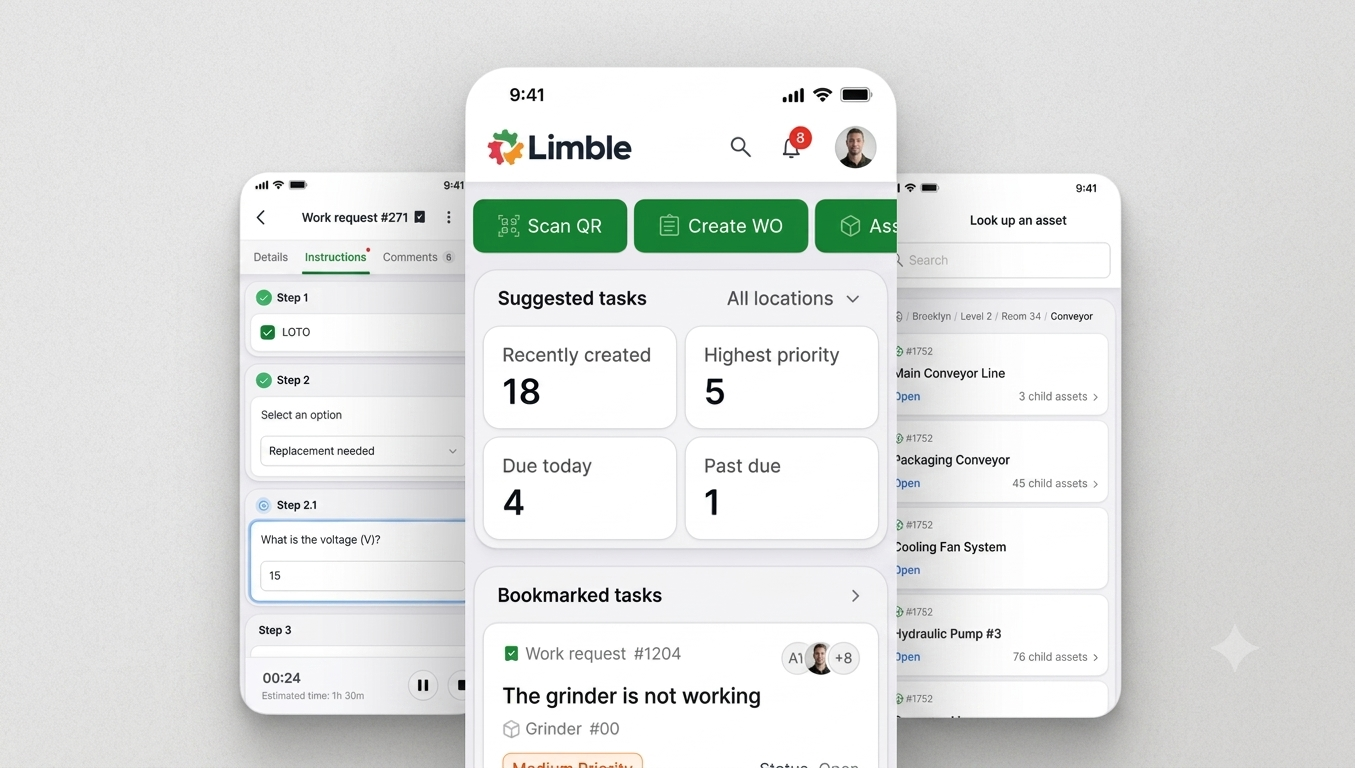
From churn risk to enterprise-ready growth: How I re-imagined Limble’s mobile app and retained $165K+ ARR

We were about to lose ARR and trust.

When I joined Limble, we were already facing immediate churn risk. We were on track to lose $165K+ in ARR if we didn’t fix the mobile experience.

About the challenge

What made it more urgent was that these issues weren’t limited to “big data” customers anymore—crashing and white screens were expanding into lower-data accounts too. In practice, the experience often looked like this:

  • Long loads and slow time-to-value

  • White screens after idling in the background

  • Freezing mid-flow

  • Data loss when sessions timed out or resync failed

Customers weren’t just annoyed—they were losing confidence. Some technicians told us they preferred loading the desktop app in their mobile browser (even with broken screens) because it froze less often.

And we were seeing competitive consequences: in mobile head-to-head trials against MaintainX, we were repeatedly losing deals because prospects felt the competitor mobile experience was smoother and easier to use.

Problem definition + hypothesis

The team’s goal was to improve the customer experience by strengthening what’s already valuable and adding value where our ICP needs it most. For mobile, that meant one thing: increase technician efficiency through a usable and reliable app.

We owned:

  • The legacy mobile platform

  • The new React Native mobile app

  • Offline mode

  • Mobile reliability and performance

And we aligned early on a simple hypothesis:

If we provide technicians with a simple, stable mobile app, we’ll increase customer satisfaction, prevent churn, and contribute to upstream sales—especially for larger commercial and enterprise customers.

How we defined success (quickly, and in data)

We anchored success on a few measurable signals:

  • App stability: Improve error-free sessions toward a 90% target.

  • User sentiment: Improve average store rating from 4.2 to 4.8 within six months of full release

    • iOS baseline: 4.6 (90 reviews)

    • Google Play baseline: 3.8 (124 reviews)

  • Technician efficiency: Increase tasks completed per user per day from 6.21 → 7.21

  • Adoption: Drive fast adoption among typical mobile users—10% within six weeks post-MVP

The four key problems we had to solve

1) Mobile stability (churn risk)

Users reported constant bugs regardless of data size. This was affected by code quality and constraints in the legacy wrapper—resulting in freezing, white screens, and crashes. The app didn’t just feel slow; it felt unreliable.

We also saw the sentiment show up in reviews:

  • “Doesn't work. I get the initial logo/splash screen then a blank white page.” (Google Play)

  • “Glitches a lot they need to fix those bugs.” (Google Play, 12/29/2024, 2 stars)

2) Mobile scalability (churn risk)

For larger customers, requests and calls could get too large. In the legacy architecture, the cache would crash the app inside the wrapper. That meant the exact customers we wanted to retain and expand—commercial and enterprise—were hitting the worst experience.

3) Offline stability (tied to DEP upsell)

Offline functionality was a business lever (tied to a DEP upsell worth $36.8K in MRR), but the current offline experience had major blockers:

  • Offline prep could crash the app

  • Cold start while offline was unreliable

  • Resync failures risked data loss (if sync failed once, users could lose work)

  • Key instructions were effectively unusable for customers

Offline wasn’t a “nice-to-have.” It was table stakes for enterprise readiness.

4) Mobile experience (pipeline and product perception)

We saw mobile UX become one of our biggest product barriers:

  • Existing customer pain tied to expected $13.6K MRR risk

  • Recent closed-lost examples totaling $2.3K MRR

  • Repeated head-to-head losses where the reason was simple: “their tech team liked MaintainX (competitor) mobile better.”

  • “75% of all our issues (with Limble) would be solved by a stable mobile app.”

    – Current at risk customer

  • "I don’t want to think about software. I want to do my job. The mobile app is adding burden at the worst possible time."

    – Current at risk customer

Our strategy: ship fast, rebuild the foundation, design for the field /technician workers

We moved with urgency: 10 months from research to shipment

From discovery and design to shipping to customers, we delivered the re-imagined mobile experience in 10 months. This wasn’t a visual refresh—we rebuilt the foundation because the business risk demanded it.

Understanding our real users: technicians in the field

Once we saw the data and the churn risk, my team and I went deeper than support tickets. We visited customers onsite, shadowed technicians, and watched the day-to-day reality of how the app was being used.

What we learned changed how we designed:

  • Many technicians weren’t native English speakers

  • They traveled between sites constantly

  • They worked in loud, distracting environments

  • They operated in bright light, dim mechanical rooms, and everything in between

  • They were under pressure—especially in emergency repair work

  • Many worked odd hours and needed the app to “just work”

  • Older users struggled to read screens and used pinch-zoom constantly

  • When they enabled accessibility zoom mode, screens could render too large and appear broken

Technicians don’t want to think about software. They want to fix and repair. The legacy app was adding burden at the worst possible time.

We built the design system while building the app

We didn’t have a formal mobile design system when we started. So we built it in tandem with the React Native app—design and engineering side-by-side—so we could scale consistency, accessibility, and component quality without slowing down delivery.

Our solution approach and what we prioritized

We organized our approach around core technician jobs-to-be-done:

  • Find the most important task quickly

    • Better lists, filtering, and sorting to match real use cases

  • Access key historical work data

    • Easy access to recent and older completed work

  • Understand assets, parts, and vendors fast

    • Clear, complete, field-friendly detail views

  • Navigate quickly to what matters

    • QR code scanning that’s easy and reliable

What we explicitly did not do / said no to (to keep MVP focused)

To ship quickly without bloating scope, we intentionally did not include:

  • 21 CFR support in MVP

  • Manager / super-user specific workflows

  • Creation flows for parts, vendors, POs, assets

  • Changes to underlying business logic (ex: we didn’t invent a new way to log time—though we could redesign the screen/flow)

Constraints we designed for

We built with real guardrails in mind:

  • Internationalization across 22 languages (including RTL)

  • Maintaining core product parity (data couldn’t disappear; it could only be presented better)

  • APIs and platform constraints (with proactive cross-team coordination to surface landmines early)

Risks and how we mitigated them

  • Value/adoption risk (low): MVP targeted users who couldn’t use the app due to crashes—stability alone created immediate value.

  • Usability risk (medium): UI would feel different, so we invested in user testing and clear documentation.

  • Viability risk (low): Scoped MVP to one core persona, shipped quickly, and learned from real usage.

  • Feasibility risk (low): React Native removed legacy blockers; we focused on finding unknown unknowns early and communicating proactively.

The impact: retention saved, enterprise unlocked, technicians happier

The new mobile app is now being used by customers and technicians who were at risk of churning—and we prevented the loss of $165K+ in ARR.

But it didn’t stop at retention.

Because we rebuilt mobile for stability, scalability, and accessibility, we also made a major business move: Limble can now pursue enterprise deals 3x larger than our historical customer base, because mobile is no longer a blocker—it’s a strength.

Technicians love the new experience because:

  • It’s reliable and fast

  • They can use it one-handed

  • It works in bright light and dark spaces

  • It’s designed for distraction-heavy environments

  • Navigation and buttons work for larger hands and gloves

  • The home screen surfaces the data they care about most so they can plan their day and prioritize the most important work

And the clearest signal of all: they no longer feel the need to load the desktop app in their mobile browser just to get through the day.

Re-imagined Mobile app feedback

“We’ve piloted the new mobile app with 18 of our most complex technicians, and the difference in speed and reliability has been huge. Honestly, the lack of complaints says a lot. Even one of our biggest critics is starting to come around — he’s already noticing the improvements.”

- Current Customer

“Our technicians love the new task format — especially how the sections are separated and the larger font size. It’s much easier to read and navigate.”

- Current Customer

“For a long time, our biggest sticking point was the mobile experience in the field — especially with unreliable connectivity causing timers to stop and users to get kicked out. But the new app is already a clear improvement. We like it so much better.”

- Current customer

Final takeaway

Re-imagining Limble’s mobile app wasn’t about “making it look modern.”

My team and I rebuilt it to protect revenue, restore trust, and enable growth.

We tackled stability, scalability, and offline readiness while designing a field-first experience grounded in real technician environments. We shipped in 10 months, built a design system in tandem, and turned mobile from a churn risk into a competitive advantage.

Next
Next

AI Search - Vision and Strategy